Requirements Analysis Using Event/Response and Use Cases – Event Discovery Part 5

Planning

This is Part 5 in my series of posts on Event Discovery. The technique I present in this post is very effective in cases where you know little or nothing about the business area under study.

Using the methods presented in my prior posts, you are able to discover Entities (e.g. “Customer”, “Sale”, “Store”, etc.) for which you need to store persistent data. As you flesh out the data needs for each Entity, here are some powerful questions that enable you to discover more events:

  • For new data elements (i.e. data that is not currently being captured in the existing system), ask “Why do you need this data? What will it enable you to do?”. The answers will be business processes that can be entered on the Event List. Once you have at least one cell of information for a row on the Event List, you can fill in the rest of the row with the relevant questions. For example, if the new piece of data is “Customer Mobile Phone #”, your business partners may say “We want to conduct text message marketing campaigns”. That answer leads you to the questions on the Event List such as “What Event starts a campaign”, “What is the input data and who/what provides it”, “What are the business processes”, “What are the outputs and who/what receives them”.
  • For existing data elements (i.e. data that is currently captured by the existing system) ask “If I took this data away from you, what will it prevent you from doing?”. This is a question that will get your business partners to think deeply about the answer, as the thought of losing something usually heightens awareness. For example, if the data element in question is the Employee Address, this may prompt your business partners to reveal all of the direct mail items sent to an Employee (an example would be “Start or open enrollment for benefits), and these would have corresponding events that initiate them.

The Event Discovery series continues in the next post.
Requirements Analysis Using Event/Response and Use Cases – Event Discovery Part 4

Planning

This is Part 4 in my series on Event Discovery techniques. In this post, I will describe how to use the major entities that you have identified as a starting point.

In the course of your requirements analysis you will have identified some entities for which you will be required to keep persistent data (these entities will translate into tables in your database when you are in the Design Phase). For each of these entities, you can discover the life-cycle (and therefore, the Events) by asking these questions:

  • What are the Create Events for an instance in this Entity? These are the Events in which your “business” first becomes aware of a specific instance of this Entity, and stores initial data.
  • What are the Read Events for an instance in this Entity? These are the Events that trigger usage of the data for this Entity without modifying the data.
  • What are the Update Events for an instance in this Entity? These are the Events which cause any of the data elements stored for this Entity to be modified.
  • What are the Delete Events for this Entity? These are the Events which cause “end of life” (defined as there will be no more need to read or modify this instance) for an instance in this Entity.

An acronym sometimes used for this analysis is “CRUD” (Create, Read, Update, Delete).

Here are some examples:

Let us say the scope of our “business” is to add the selling of refrigerated beverages in retail stores. Some Entities you might have identified are “Store” and “Product”. Let us examine each of these using CRUD.

For “Store”:

  • The Create Event might be “Store is opened”. That would lead you to ask questions such as “How do we get refrigerators to new stores?” and “How do we get the initial inventory of product to new stores?”. The answers lead to more Events.
  • Some Read Events are “Inventory or Sales requests by Store, Region, or Territory”.
  • Some Update Events can be “Store temporarily closed for remodel” or “Store commencing a going out of business sale”. This would lead you to ask questions such as “What do we do with existing inventory of refrigerated product?”.
  • A Delete Event would be “Store is closing”. This leads you to questions such as “What do we do with the refrigerators and the inventory contained within?”

For “Product”:

  • The Create Event could be “Product is ordered”. This would lead you to ask questions such as “How do you know you need to order product?” and “How do you know how much of each type to order?”. The answers will certainly lead to new Events.
  • A Read Event might be “Requests for Sales by product type”.
  • Some Update Events are “Product is sold” and “Product is restocked”.
  • A Delete Event could be “Specific Product type discontinued”.

Keep doing this for all of your identified Entities. You may be surprised how enlightening this is, revealing many Events that other forms of analysis would miss. Keep in mind, once you have identified new Events and added them to your Event List, you will fill in the detail for each column in the list and do the analysis of the Event Outputs described in a prior post.

In the next post I will describe how to use the data elements int eh Entities to discover more Events.

Requirements Analysis Using Event/Response and Use Cases – Event Discovery Part 3

Planning

This is the third part in the series on Event discovery. In the first two parts I covered discovering Events using the Context Diagram and the Outputs listed on the Event List. In this post, I will cover using a technique known as “State-Transition”.

In specific cases of analysis where there is a central entity that moves to a variety of “states” during its life, the State-Transition diagram can be very useful in discovering Events. Let us take the example of a retail product where the project sponsor wishes to track the product in all of its possible states. The following are possible examples of the states of this product:

  • Designed
  • Ordered]
  • Manufactured
  • Shipped / In-Transit
  • Arrived at Distribution Center
  • In Inventory
  • Allocated to Store
  • Packed
  • Shipped to Store
  • Arrived in Store
  • Available for Sale
  • Sold

Each of these states has a corresponding Event that causes the product to transition from one state to the next. For example, the transition from “In Inventory” to “Allocated to Store” could be triggered by the data event “Store Inventory Level for this Product drops below reorder point”. Now that you have the Event, you can fill in the rest of the row on the Event List in discussion with the SME’s (Subject Matter Experts).

Note that it is possible and allowed for an Entity in a given State to transition to more than one possible State, depending on the Event. For example, an Employee can transition to a new job (via promotion or transfer) or transition to full-time or part-time, or transition to terminated.

Knowing all of the relevant States of an Entity can be very useful to filling out the Event List in certain analysis situations.

In the next post, I will present another Event discovery technique involving the life cycle of key Entities.

Requirements Analysis Using Event/Response and Use Cases – Event Discovery Part 2

Planning

In the previous post I discussed how to use the Context Diagram for initial Event discovery. In this post I will present how to use the outputs from your Event List to discover more events.

The fifth column in your Event List (the one labeled “Which creates this…”) are the outputs of your business processes. You can use these outputs to discover more Events by asking the following questions for each output:

  • Does the output go to a “Customer”? (an entity outside of the center bubble in the Context Diagram). If yes, then that is where the output ends. If no, then that means it must be input to another event or the output has no purpose. Ask your SME’s (Subject Matter Experts) what other business processes use this data. For each identified business process, you can flesh out the Event List row for that process.
  • What are the “Create” Events for this output? These are the Events that result in the establishment of a new row (or rows) of data in the output in question. For example, the sale of a product creates a Sales Transaction record. Note there may be more than one Event that creates rows in this output.
  • What are the “Change” Events for this output? For this you may need to examine each data element in the output. For each element, ask the SME’s what business processes change this data. Use these answers to continue to build the Event List.
  • What are the “Delete” Events for this output? These are the Events that result in the logical or physical removal of a row in the output. For example, if the record retention requirement for the output is 5 years, then the time-based event “Record Retention Limit Reached” will be added to your Event List.

Now that you have added many more rows to your Event List, you will have more outputs to examine. Cycle back thru the Event List outputs and ask the same questions listed above. You will find your Event List grows very quickly!

In the next post I will continue to present additional techniques for Event Discovery.

Requirements Analysis using Event/Response and Use Cases – Business Events

Planning

For the purpose of this analysis approach, “Business Events” are anything that occurs that causes your “business” to initiate a business process. Defining all of the Business Events in scope will lead to discovery of the business process in scope.

There are three main types of Business Events:

  1. External: These come from outside of your business and you have little or no control as to when or how often these events occur. Examples are “Customer purchases Product” or “Associate requests time off”.
  2. Temporal: These events happen at regular predetermined intervals. These intervals are required, they are not a business or design decision. Don’t let technology limitations determine the interval. Good Example: “It is time to file quarterly taxes”. Bad Example: “Every two hours the HR system sends employee information to the Financial System”.
  3. Data/System State: Occur when the data or system reaches a predetermined condition. These are usually Business Rules or Policy decisions. Example: “Product is re-ordered when the inventory level reaches 5”.

The input arrows on the Context Diagram are the starting point for event discovery. In the next post I will define the elements of the “Event List”.

Requirements Analysis using Event/Response and Use Cases – The Context Diagram

Planning

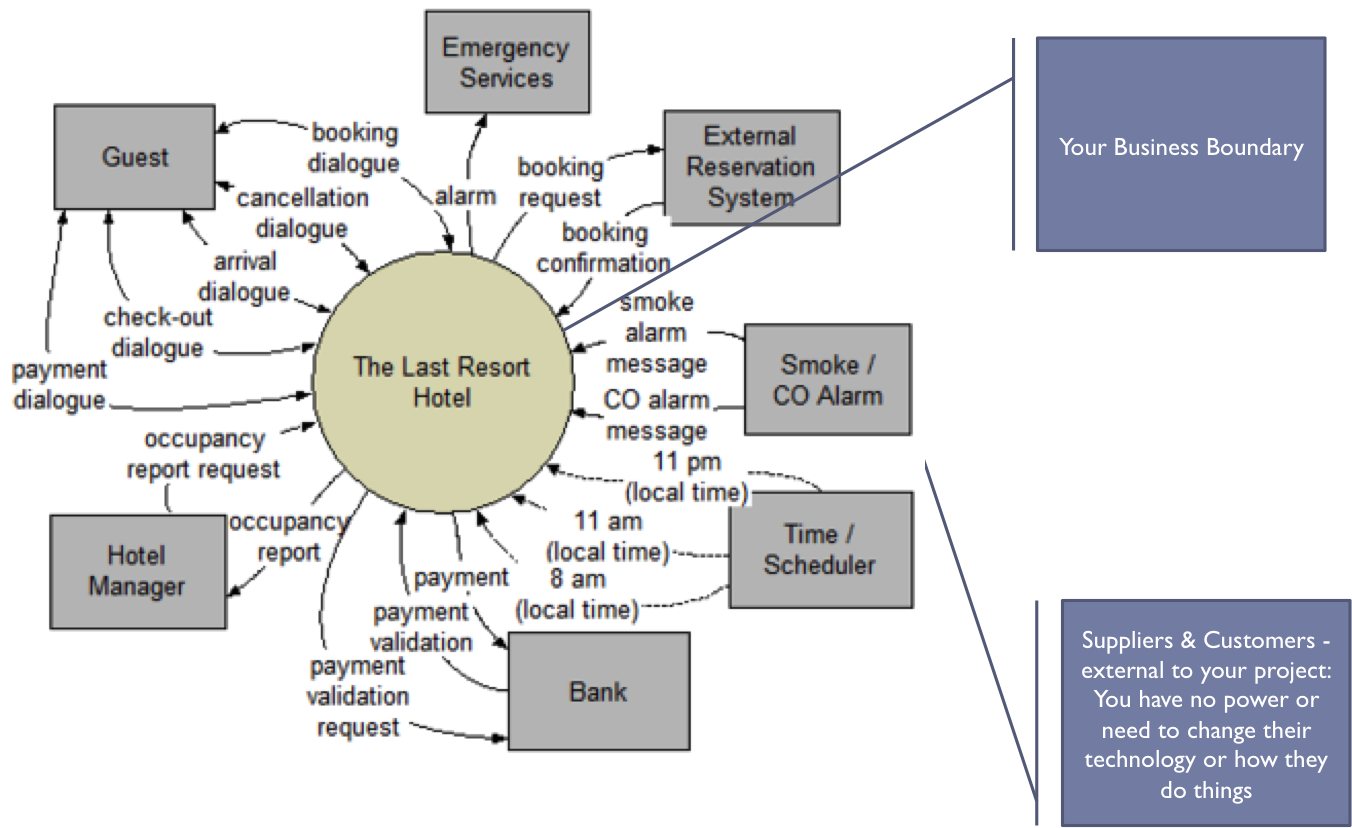
The Context Diagram is the place to start when doing your analysis. It should be done in conjunction with the stakeholders that are most knowledgeable about the business processes for the domain under study. The initial list of Business Events will be derived from the Context Diagram.

Start with a circle in the middle of the diagram. This represents the area of the business in the scope of the project. All of the processes within this circle are in scope and are able to be modified or added to as part of the project scope. Think of it as if this business function were outsourced to a service provider and the Executive Sponsor of the project is the CEO of this service provider. What would they need to know to create a business model?

First, you would want to define “who are my Customers?”. Your Customers are recipients of your business’s outputs (in most projects, these are flows of information and data). Ask the key stakeholders “who are the current recipients of information your business function?”. Draw the Customers as rectangles on the right hand side of the diagram. It is not important at this time that you have the complete list of Customers, only that you have some. We will complete the list of Customers in an iterative process in conjunction with the Event/Response Model.

Next, define the types of information that flow to each Customer. Draw these as arrows from the center circle and connecting to the Customer rectangle. Have a short, high level description of the flow on each arrow.

After that you need to define “who are your Suppliers?”. The Suppliers are providers of the business’s information and data. Ask the key stakeholders “who are the current providers of information for your business function?”. Draw the Suppliers as rectangles on the left hand side of the diagram. It is not important at this time that you have the complete list of Suppliers, only that you have some. We will complete the list of Suppliers in an iterative process in conjunction with the Event/Response Model.

Next, define the types of information that flows from each Supplier. Draw these as arrows from the Supplier rectangles and connecting to the center circle. Have a short, high level description of the flow on each arrow.

Rules for Suppliers and Customers:

  • They can be individuals, roles, departments, organizations, systems, vendors, etc. Anything that is a net originator or receiver of data or information from your “business”.
  • Some entities can be both Suppliers and Customers. so they will have arrows going in both directions.
  • If you are struggling with whether a Supplier or Customer is inside or outside the circle, the general rule is for entities outside the circle, the project has no control over their processes. The project can only change the nature and content of the information flows to and from these entities.
  • There are no flows represented that go from entity to entity. They may exist but they are of no concern to the project.

Here is an example of a Context Diagram:

Context_Diagram

Requirements Analysis using Event/Response and Use Cases – The Event Model

Planning

The Event Model looks at the scope of your project as if this business function is being outsourced to a third party business and your Executive Sponsor is the CEO of that business. This is the new way of thinking about requirements that I referred to in the Overview post.

The Event Model consists of the following elements:

  • The Context Diagram – shows your business boundary as a circle in the center of the diagram with your suppliers, customers and information flows surrounding the center circle. I will present this in detail in the next post.
  • The Event/Response Model – this contains the detail of the events that “wake up your business” and requires the business to have a planned response. It is progressively elaborated in conjunction with the Context Diagram. More on this in a future post.
  • Use Cases – are derived from the Event/Response Model and show the specific steps required for each business response. At the end of the requirements analysis, this becomes (or is the basis for) your “Business Standard Operating Procedures Manual”. Functional Requirements are derived from the Use Cases.

An important thing to remember when creating the Event Model is to keep it independent of technology. It needs to address “what we do” and not “how we do it”. Doing this will help you envision more design alternatives than you would if you locked in a solution at the requirements level.

In the next post I will give you a closer look at how to create a Context Diagram and utilize it to get the requirements discovery rolling.

Requirements Analysis using Event/Response and Use Cases – Business/Project Objectives

Planning

If you search this site using the keyword “objectives”, you will see my prior posts on the importance of documenting your Business and Project Objectives, as well as how to properly define them. Those posts framed objectives in the context of the Project Management process. Having the objectives defined is also critical in the requirements analysis process.

Here are some of the key reasons for knowing your Business and Project objectives in advance of your requirements analysis:

  1. Ensure that everyone on the project team understands the project vision. There is a saying in the military that “no plan survives contact with the enemy”. That is also true for projects (where the “enemy” is usually time and resources). However, if everyone understands the commander’s intent (the “objectives”), then it is easier to change and adapt the plan. Conditions may make you unable to execute the original plan, but you are always responsible for achieving the commander’s intent.
  2. The Objectives guide everyone’s decision making. There are many decisions made each day on a project. They are made by everyone on the team, not just the management. Along with empowering people to make decisions, you must give them the tools to make the right decisions. Chief among those tools is making sure they know and understand the Business and Project Objectives.
  3. The Objectives are used to validate the Requirements Model. At the end of the first round of analysis, you will compare the results to the documented Project and Business Objectives. Do your requirements address all the deliverables in the Project Objectives? If not, another round of analysis is needed. Will the requirements achieve the Business Objectives? If not, understand why. Has your analysis revealed additional Project Objectives? If so, these must be addressed in your Change Management process in order to change your Project Charter.

In the next post I will define the Event Model, with subsequent posts addressing each element in detail.

Requirements Analysis using Event/Response and Use Cases – Analysis Sequence

Planning

Getting requirements right is a process. Your business stakeholders will rarely (if ever) be able to give you all of their requirements without some method of generating relevant questions to draw the requirements from them. What I am going to present in this and the following posts on this topic is NOT a new way to document your old thinking. It is a new way to think about requirements.

The deliverables created from this approach are:

  • Identification of all processes in scope
  • Documentation of the specific Use Cases for each process
  • Identification of all of the stakeholders that interact with the business processes
  • Creation of a framework with which you can generate and execute your test cases

Many analysts start and end their requirements elicitation with “functional requirements” (e.g. “I need to search by Last Name” or “Requests for time off need to be approved by the manager”). In the Event/Response/Use Case approach, functional requirements are derived from the Use Cases at the end of the analysis process.

The analysis sequence is as follows:

  • Business Objectives
  • Project Objectives (1st cut)
  • Event Model
  • Project Objectives (verified)
  • Use Cases
  • Functional Requirements

In the next post, I will discuss how the Business and Project Objectives are defined and used in the Event/Response methodology.

Requirements Analysis using Event/Response and Use Cases – Overview

Initiation

This is the start of a multi-part series on my favorite requirements elicitation technique: the Business Event/Response Analysis. Early versions of this methodology were developed in the late 1980’s by some of the great system development minds of that era. Since then it has evolved and I have adapted it to meet the needs of whatever organization in which I am working.

There are some that think you can gather requirements by just asking the sponsors and users “what do you want?”. Needless to say, this method will generate incomplete requirements and tends to start and end with functional requirements. In the latter half of the project when large requirements gaps are discovered, the sponsors/users blame the analyst and vice versa.

When I teach on this topic, I tell the analysts it is their responsibility to gather complete requirements. Given this, we need a method that will (1) generate the appropriate questions to ask, (2) ensure that we have the complete set of requirements, and (3) allow us to derive the functional requirements from the model.

The Business Event/Response method meets these desired outcomes. The advantages are:

  • It helps the Business Analyst create the questions needed to draw the requirements from the Business Owner, even if the Analyst has no knowledge of the business area.
  • It organizes the requirements in the context of Business Processes and Usage to promote better understanding.
  • The output serves as a starting point for defining the testing scope and scenarios.

In the upcoming posts I will describe this method in detail.